
Managing email logging in HubSpot can be tricky. Learn how you can stop logging every email in HubSpot but still capture the ones you want.
For years, HubSpot users have asked for more control over logging emails in HubSpot. The request has only grown louder since the adoption of stricter privacy laws globally, highlighting the importance of keeping CRM data clean and relevant.
If you’re frustrated by HubSpot automatically logging every email—and especially the unwanted ones—you’re not alone.
How HubSpot Logs Emails
Most HubSpot users rely on HubSpot’s native Gmail or Outlook plug-ins to manage email activity. Logging an email in HubSpot means the platform saves a copy of the message to the recipient’s contact timeline. This can be a useful feature but problems arise when HubSpot logs emails you don’t want.
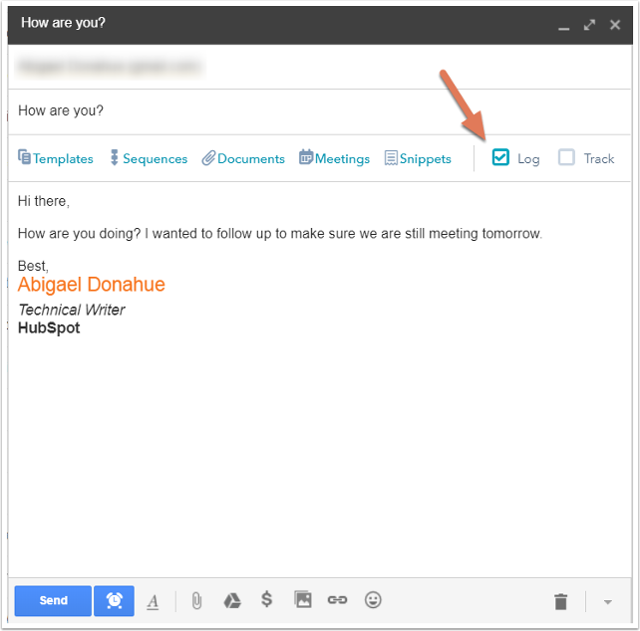
Automatic Contact Creation: The Hidden Catch
Here’s what many users don’t realise:
When you check the “Log” box, HubSpot doesn’t just record the email—it also creates a new contact in your CRM if one doesn’t already exist.
This means:
- Spam or irrelevant messages can create junk contacts
- Personal contacts you never intended to store may be added
- Your CRM quickly becomes crowded
Why Logging Every Email in HubSpot Is a Problem
Automatically logging every single email might sound convenient, but in practice it:
- Fills your CRM with irrelevant records.
- Makes reporting less accurate.
- Wastes time cleaning up bad data.
For example, let’s say you CC an external party on a deal-related email. Unless you uncheck the log option, HubSpot will happily create a brand-new contact record for them—even if they’re not relevant to your pipeline.
A Smarter Way to Control Logging Emails in HubSpot
The good news: there’s a solution.
The Threads integration for HubSpot syncs with your email client but only logs emails where the recipient already exists as a contact in your HubSpot CRM. That removes accidental contact creation,de-clutters your CRM and saves you time by not having to manually toggle “Log” on and off. And unlike HubSpot’s native plug-ins, Threads works with any email client—including Outlook for Mac and Apple Mail.
One price for your whole team
Threads offers simple, scalable pricing starting from just £65 / $85 per month. Add as many users as you need within your data limit, and even import historic email archives to make your HubSpot migration seamless (charged separately).
You can try Threads free for 14 days, or request a one-off migration quote if you’re moving existing emails into HubSpot.
If you’re tired of logging every email in HubSpot and want more control, Threads is the smarter way forward. Keep your CRM clean, save time, and ensure only the right emails are logged.
FAQ
To stop logging every email in HubSpot, you need to disable the Log email option in the Gmail or Outlook integration before sending each message. When the log option is unchecked, HubSpot will not save the email to the contact’s timeline. However, this must be done manually for every email unless you use a third-party integration that controls logging automatically.
HubSpot logs emails automatically when the “Log” checkbox is enabled in the Gmail or Outlook extension. This feature saves a copy of the email to the recipient’s contact timeline so sales and support teams can track communications inside the CRM.
While useful, it can also log emails that are not relevant to your CRM records.
Yes. When an email is logged and the recipient does not already exist in HubSpot, the system can automatically create a new contact record.
This means emails sent to unknown addresses, CC recipients, or external contacts may create new contacts in your CRM without you intending to add them.
Yes. HubSpot allows users to choose whether to log an email before sending it by toggling the Log checkbox in the email integration.
However, this requires users to manually manage logging for every message, which can be easy to forget when sending large volumes of emails.
The most effective way to control email logging is to use a system that only logs emails for contacts already in your CRM.
This prevents new contacts from being created accidentally and ensures only relevant customer communications appear on contact timelines.
HubSpot’s native logging tools mainly work with Gmail and Outlook integrations.
If your team uses other clients such as Apple Mail or Outlook for Mac, you may need an external integration that syncs emails with HubSpot.
Yes. Some integrations allow emails to be logged only when the recipient already exists as a contact in HubSpot.
This prevents the CRM from creating unwanted contact records and keeps your customer database focused on genuine prospects and clients.